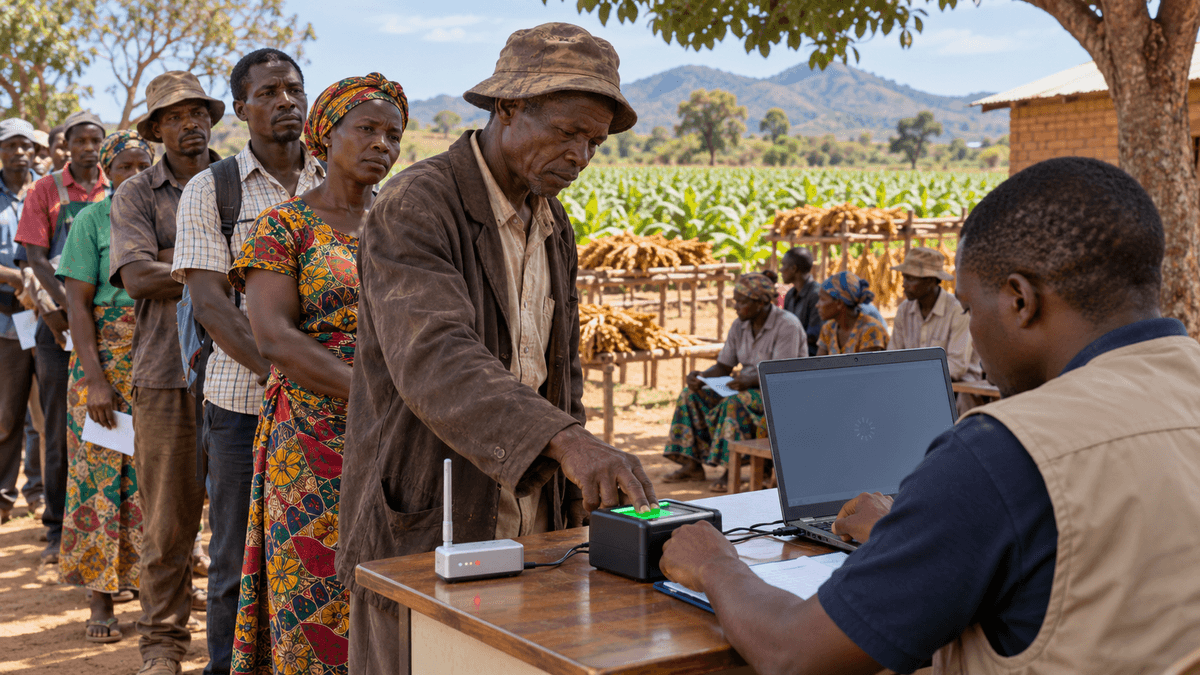

Malawi’s Electronic Invoicing System can work through MRA’s own tools or through approved integrations with existing POS and accounting software. This guide explains the practical preparation, API lifecycle and operational controls businesses should understand before integrating.
MRA EIS Integration in Malawi: A Practical Guide for Businesses Using POS and Accounting Software
Malawi’s shift from Electronic Fiscal Devices to the Malawi Revenue Authority’s Electronic Invoicing System changes more than the way a receipt is printed. For businesses that already use a point-of-sale, ERP, retail, inventory or accounting platform, the important question is whether to operate separately inside MRA’s own tools or connect the existing system directly to EIS.
MRA explicitly supports integration. Its public FAQ says EIS can integrate with other business systems or accounting software through APIs, and its developer documentation describes an internet-accessible REST/JSON interface for POS systems to transmit invoice data. That means a business does not necessarily have to abandon a well-functioning operational system simply because EIS is now part of tax invoicing. The harder part is making sure the integration respects MRA’s onboarding, inventory, terminal, invoice and synchronization rules.
This guide explains what a business and its software team should prepare before starting an EIS integration, what happens during terminal activation, how invoices and stock data fit together, and what to test before relying on the connection in production.
What is MRA EIS?
The Electronic Invoicing System is Malawi Revenue Authority’s platform for issuing electronic tax invoices and maintaining stock records for tax purposes. MRA describes EIS as a software-based replacement for the older Electronic Fiscal Device model, with transaction data transmitted to MRA electronically.
For businesses, EIS sits at the intersection of tax compliance and day-to-day operations. Sales, stock, branches, products or services and receipts are not isolated technical objects: they have to agree with what is registered and approved in the MRA environment.
That is why an integration project should not begin with coding alone. It should begin with the taxpayer account, business structure, inventory or service setup, branches and terminal lifecycle.
Do you need custom EIS integration?
There are two broad operating models.
1. Use MRA-provided EIS tools
A business can use the EIS portal or MRA POS applications directly. This can be appropriate when the business has a simple sales process, does not depend on an existing ERP/POS workflow, or can manage invoicing and stock inside MRA’s tools without creating duplicate operational work.
2. Integrate an existing POS or accounting system
Integration becomes more attractive when a business already relies on its own software for checkout, customer management, stock, branches, reporting, finance or workflow automation. Instead of asking staff to enter one transaction into the business system and another into EIS, the objective is to make the existing system exchange the required information with MRA automatically.
MRA’s developer documentation is designed for this scenario. It describes terminal activation, configuration, product/service synchronization and submission of sales data through API endpoints.
The business decision should therefore be based on workflow complexity, transaction volume, number of branches, existing software investment, staff processes, reporting requirements and the operational risk of duplicate data entry.
Step 1: Complete taxpayer and EIS onboarding first
MRA’s pre-integration guidance requires registration in the EIS taxpayer environment before API integration begins. Business details need to match the taxpayer information held by MRA, including identifiers and contact information used during registration.
This matters technically because an API integration cannot compensate for an incomplete or inconsistent taxpayer setup. If the organization, branches, products or services are not correctly represented in EIS, the POS or accounting application will eventually synchronize against incorrect or incomplete reference data.
Before development starts, verify:
- the taxpayer/EIS account is active;
- the correct business type has been selected;
- taxpayer identifiers and contact details are consistent with MRA records;
- the people responsible for tax, finance, operations and software implementation agree on the onboarding state.
Step 2: Prepare products, services, stock and branches
MRA distinguishes between product-based and service-based businesses in its developer onboarding guidance.
For product businesses, the EIS workflow includes a virtual warehouse, initial stock upload, approval, branch setup and stock transfer. MRA’s documentation makes clear that stock becomes part of the integration model rather than remaining entirely local to the business application.
For service businesses, the workflow is simpler because physical stock is not required, but services still need to be registered and made available for terminal use.
The practical implication is important: do not design EIS integration as a one-way “send invoice” connector. Your system also needs a dependable strategy for synchronizing the products or services recognized by MRA, mapping identifiers, handling tax classifications and keeping branch-level operational data aligned.
Step 3: Decide what system remains the operational source of truth
A common integration failure is allowing two systems to become independent masters for the same data.
Before writing code, define ownership for:
- products and services;
- prices and tax types;
- stock and stock movements;
- branches;
- customers where relevant;
- sales transactions;
- receipt identifiers;
- cancellations, reversals or corrections;
- user/operator identities;
- end-of-day and finance reporting.
MRA centrally manages important EIS inventory and approval state. Your business system may still be the operational interface used by staff, but the integration must respect the reference data and status returned by MRA.
A clean architecture normally treats the local application as the workflow layer while maintaining explicit mappings to MRA identifiers and statuses rather than pretending the two data models are identical.
Step 4: Acquire and activate an EIS terminal
MRA’s EIS lifecycle uses terminal acquisition and a Terminal Activation Code. The taxpayer applies for a terminal, receives the activation code after approval, and the POS or accounting software uses that code during API activation.
The activation response provides configuration required for subsequent communication with MRA. MRA’s documentation also indicates that the activation code expires after the terminal configuration has been confirmed, which means activation should be treated as a controlled provisioning process rather than a credential that is repeatedly reused.
From a software-engineering perspective, terminal activation should include secure storage of returned configuration, controlled access to activation secrets, audit logging and a clear recovery procedure if a device or installation is replaced.
Step 5: Synchronize approved products or services
MRA’s pre-integration guide identifies an endpoint for retrieving terminal-site products and services. The intent is to make approved MRA items available inside the POS or accounting system and prevent sales from being submitted against arbitrary or unmapped records.
For a production integration, build a mapping layer that records both the local item identifier and the MRA-recognized identifier. Do not rely only on names because descriptions can change and duplicate names can exist.
Your synchronization job should also be able to detect:
- a newly approved item;
- an inactive or changed item;
- a tax-type change;
- a branch assignment change;
- a stock/status mismatch;
- a failed synchronization that needs retry or operator attention.
Step 6: Submit each sale and handle the validation response
MRA’s technical overview says each receipt requires an API call to inform MRA of the sale. MRA then returns invoice-validation information used for the receipt, including data that supports the QR code appearing on the invoice.
This makes error handling a core business requirement. A checkout application should never assume that “the customer paid” and “MRA accepted the invoice” are the same event.
Design explicit transaction states, for example:
- sale initiated;
- payment confirmed;
- EIS submission pending;
- EIS accepted and receipt finalized;
- retry required;
- operator intervention required.
The exact states will depend on the business and MRA’s API contract, but the principle is universal: the system must make incomplete tax-invoice submission visible and recoverable.
Step 7: Design properly for connectivity problems
Connectivity matters in Malawi, particularly for distributed branches and locations with inconsistent internet access. MRA’s public FAQ says its desktop/mobile POS tools can support offline invoicing, while the technical API overview describes an offline queue model for terminals certified to operate offline.
Do not interpret this as permission to invent an offline protocol. Offline behaviour needs to follow the MRA-certified integration model and its configuration requirements.
For an approved offline-capable integration, engineering concerns include:
- durable local transaction queues;
- idempotent retry logic so a receipt is not submitted twice;
- ordering where transaction sequence matters;
- secure local storage;
- synchronization status visible to staff;
- recovery after restart or power loss;
- reconciliation of the last successful online/offline transactions.
A branch should be able to tell which transactions have reached MRA and which are still pending.
Step 8: Build reconciliation and auditability from day one
EIS integration affects finance and compliance, so a successful API response should not disappear into application logs.
Keep an auditable record of:
- local transaction ID;
- MRA invoice/reference identifiers returned by the API;
- terminal and branch;
- submission time;
- response status;
- retry history;
- operator where applicable;
- cancellation/reversal relationships;
- synchronization exceptions.
Reconciliation should make it possible to compare business sales with EIS submission state and quickly identify transactions that require correction.
Step 9: Test business scenarios, not just endpoints
An API can pass technical tests while the business workflow still fails.
Before production rollout, test complete scenarios such as:
- first sale after terminal activation;
- product and service sales;
- different applicable tax treatments;
- branch-specific transactions;
- stock synchronization;
- connectivity loss during checkout;
- retry after timeout;
- duplicate-submission protection;
- restart with queued transactions;
- invalid or inactive item mapping;
- rejected API response;
- receipt/QR generation;
- daily reconciliation;
- staff permissions and operator accountability.
Use MRA’s sandbox/developer environment and certification process as the governing technical authority. Production should come only after the integration satisfies MRA’s requirements and the business has validated its own operational controls.
What should you ask a POS or software vendor?
If you are buying or upgrading software rather than developing the connector internally, ask the vendor for evidence rather than a generic promise that the system is “EIS ready.”
Ask whether the solution supports the current MRA EIS API, how terminal activation is handled, how approved products/services are synchronized, what happens when MRA is temporarily unreachable, how failed submissions are surfaced, how transaction reconciliation works, how credentials/configuration are secured, whether the vendor follows MRA certification requirements, and how API changes will be maintained after deployment.
The integration should reduce compliance workload, not hide it behind an opaque black box.
A practical implementation architecture
A maintainable EIS integration can be separated into a few clear components:
- EIS adapter: isolates MRA-specific request/response logic from the rest of the application;
- mapping layer: links local branches, terminals, products/services and tax data to MRA identifiers;
- transaction outbox/queue: tracks invoices that need reliable submission or retry;
- configuration/credential store: protects activation and terminal configuration;
- synchronization worker: refreshes MRA-controlled reference data;
- reconciliation service: compares local sales with EIS submission outcomes;
- operator dashboard: exposes failures and pending items that need action;
- audit log: records security- and compliance-relevant integration events.
This separation makes the business system easier to maintain if MRA changes endpoints, validation rules or operational requirements later.
Final checklist before production
A business should be able to answer yes to the following before relying on its integration:
- taxpayer/EIS registration is correct;
- stock or services are properly registered and approved;
- branches are configured;
- required terminals are approved and activated;
- local-to-MRA item mappings are controlled;
- each sale has a clear EIS submission state;
- failed calls are retried safely;
- duplicate submissions are prevented;
- approved offline behaviour is implemented where required;
- transaction and synchronization logs are auditable;
- staff can see and resolve exceptions;
- sandbox and certification requirements have been completed;
- the business has a support and maintenance process for future EIS/API changes.
EIS integration is a business-system project, not only an API task
The strongest implementation is not the one with the fewest lines of integration code. It is the one that lets staff continue working normally while tax-invoice, stock and terminal state remain synchronized, traceable and recoverable.
For Malawi businesses with an existing POS, ERP or accounting platform, EIS is therefore an opportunity to improve system discipline at the same time as compliance. A well-designed integration can remove duplicate entry, strengthen reconciliation and make failures visible before they become larger operational problems.
Offensive X can help assess an existing business system, design the EIS integration architecture and implement the API, synchronization, security and reconciliation layers needed for a production-ready workflow.
EIS integration is a business-system project, not only an API task.
- MRA supports API integration between EIS and existing business or accounting systems.
- A dependable implementation begins with taxpayer, branch, product/service and terminal setup—not with invoice code alone.
- The integration should maintain explicit local-to-MRA mappings and visible transaction submission states.
- Offline and retry behavior must follow the MRA-certified model rather than an invented local protocol.
- Production readiness requires reconciliation, auditability and complete business-scenario testing.
Editorial transparency
How this Insight was prepared
- First published
- September 11, 2026
- Last reviewed
- September 11, 2026
Sources
Verified references used to support this article. Internal research notes are not published.
- EIS Frequently Asked QuestionsMalawi Revenue Authority · Primary source
- EIS API IntroductionMalawi Revenue Authority · Primary source
- Developer Pre-Integration GuideMalawi Revenue Authority · Primary source
- EIS Technical OverviewMalawi Revenue Authority · Primary source
- Transition from Electronic Fiscal Devices to the Electronic Invoicing SystemMalawi Revenue Authority · Primary source
- Value Added Tax (Electronic Invoicing System) Regulations, Government Notice 6 of 2026MalawiLII
Commercial disclosure
Offensive X publishes this guide for an audience relevant to software engineering, API integration and digital-transformation services it offers.